Dinosaur Evolution: Merge Game1.3
Publisher Description


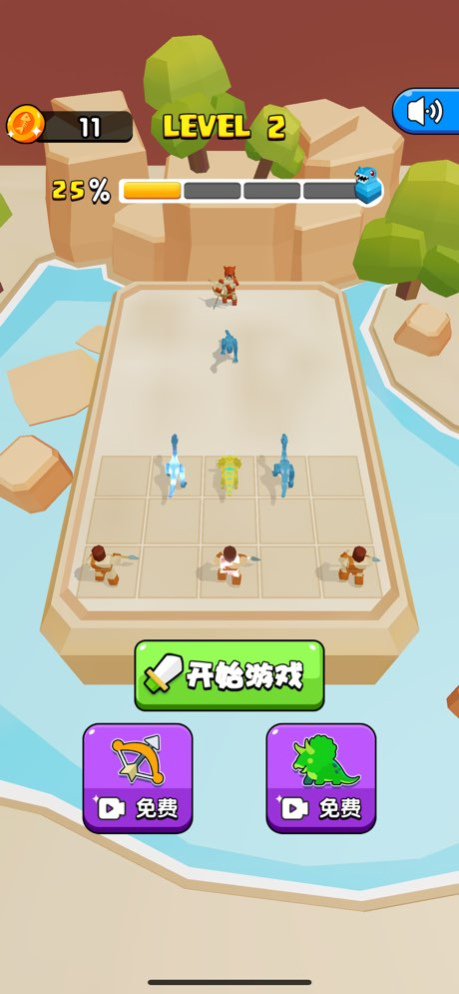
"Dinosaur Evolution: Merge & Fight" is our latest popular combat placement game! It features stunning 3D graphics that bring the thrilling world of dinosaurs to life. It will transport you back to the prehistoric Jurassic era, where you become a wild primitive human!
Key Gameplay Features:
1. Game Objective: In "Dinosaur Battles and Dinosaur World", defeat other primitive humans and their trained dinosaurs, place legion dinosaurs, and dominate Dinosaur Island.
2. Gameplay Mechanics: You can produce hunters or dinosaurs. By placing two identical units and dragging them together, you can evolve them into more powerful dinosaurs or hunters. Producing units requires spending coins, so don't miss the chance to double your coins at the end of each round or the loot boxes dropped by Pterosaurs during battles!
3. Strategic Depth: Upgraded hunters can hunt dinosaurs from a distance, while dinosaurs engage in close combat. You'll need to strategically assemble and upgrade your team of giant dinosaurs and hunters to defeat your opponents. You can also adjust the formation of your dinosaurs and hunters. Try placing dinosaurs in the front row and archers in the back! Experiment with various combinations to defeat different enemies and build your dinosaur empire!
Game Features:
1. Rich Characters: There are dozens of different 3D dinosaurs and hunters, including Velociraptors, Triceratops, Stegosauruses, Brachiosauruses, and even T-Rex! There's also a small chance to obtain super-strong versions of dinosaurs and hunters to help you snipe your enemies. Be skilled at pairing hunters and dinosaurs, with hunters being long-range attackers and dinosaurs serving as melee units. Hunters can be upgraded into spear throwers, archers, catapult operators, and more for long-range attacks. Meanwhile, dinosaurs, as tank and melee units, need to be strategically placed in the front row to deal maximum damage. Let's evolve some mighty dinosaurs together!
2. User-Friendly Controls: Set up your offensive tower defense formation with simple clicks and drags and annihilate enemy tribes with ease!
3. Outstanding Graphics: Immerse yourself in a visually stunning world of fierce monsters with jaw-dropping 3D graphics that enhance your gaming experience.
Future Updates: We plan to introduce more types of primitive humans and dinosaurs in future versions, as well as other prehistoric creatures, ancient mythical beasts, and mysterious super-evolved creatures from the future, such as mammoths, phoenixes, and Medusa. The game's scenarios will expand from the primitive Jurassic Dinosaur Park to the Cretaceous Dinosaur Continent and even to wandering small planets in outer space. Let's embark on an extraordinary brawl like no other!
Version History Fix bugs and improve user experience 1.3 10/15/2023 修复问题,提升用户体验 1.2 10/04/2023 修复问题,提升用户体验 1.1 09/27/2023 1.0 09/26/2023
About Dinosaur Evolution: Merge Game
The company that develops Dinosaur Evolution: Merge Game is 靖 王. The latest version released by its developer is 1.3.
To install Dinosaur Evolution: Merge Game on your iOS device, just click the green Continue To App button above to start the installation process. The app is listed on our website since 2026-10-13 and was downloaded 0 times. We have already checked if the download link is safe, however for your own protection we recommend that you scan the downloaded app with your antivirus. Your antivirus may detect the Dinosaur Evolution: Merge Game as malware if the download link is broken.
How to install Dinosaur Evolution: Merge Game on your iOS device:
- Click on the Continue To App button on our website. This will redirect you to the App Store.
- Once the Dinosaur Evolution: Merge Game is shown in the iTunes listing of your iOS device, you can start its download and installation. Tap on the GET button to the right of the app to start downloading it.
- If you are not logged-in the iOS appstore app, you'll be prompted for your your Apple ID and/or password.
- After Dinosaur Evolution: Merge Game is downloaded, you'll see an INSTALL button to the right. Tap on it to start the actual installation of the iOS app.
- Once installation is finished you can tap on the OPEN button to start it. Its icon will also be added to your device home screen.
Program Details
System requirements
Download information
Pricing
Version History
version 1.3
posted on 2026-10-13
Version History Fix bugs and improve user experience 1.3 10/15/2023 修复问题,提升用户体验 1.2 10/04/2023 修复问题,提升用户体验 1.1 09/27/2023 1.0 09/26/2023
version 1.3
posted on 2023-10-15
Fix bugs and improve user experience
